
Change of Employer Calculator: Avoid DLOCK_10 Errors
When an apprentice changes employer mid-programme, training providers face a perfect storm of complexity: residual funding calculations, the notorious DLOCK_10 error risk, and month boundary rules that seem to defy logic. Last year, employer changes triggered over 15,000 DLOCK_10 errors across the UK, each one blocking funding payments until providers and employers could untangle the mess of misaligned dates and incorrect residual prices.
The Funding Fox Change of Employer Calculator eliminates this complexity by automatically calculating residual funding, recommending correct Apprenticeship Service dates, and validating everything against DfE rules before you submit. This guide explains the critical 30-day rule, why getting DAS months wrong causes DLOCK_10, and how residual pricing actually works—so you understand the logic behind the calculations and can handle employer changes confidently.
The 30-Day Rule: Continuation or Restart?
When an apprentice leaves one employer and joins another, the first question determines everything else: can this be treated as a continuation, or does it require a full withdrawal and restart? The answer hinges entirely on the employment gap between the two roles.
If the gap is 30 days or less, you can treat the change as a continuation of the existing programme. The same programme aim continues in the ILR with no break in learning recorded. You create a new price episode using residual pricing (TNP3 and TNP4), add a new employment status record for the new employer, and update the training plan to show both employers. This approach maintains programme continuity, keeps the 20% completion payment available, and avoids the administrative burden of starting fresh.
If the gap exceeds 30 days, you must record it as a withdrawal from the original employer and a new start with the new employer. This requires withdrawing or closing the original programme aim, starting a completely new programme aim, obtaining a full new funding agreement, and securing a new funding reservation for non-levy employers. It's more complex ILR recording and loses some benefits of the continuation approach.
The 30-day threshold balances programme continuity against genuine employment breaks. Gaps of a few weeks often occur during notice periods, employer onboarding, or handover arrangements—these shouldn't force apprentices to start over. Longer gaps suggest a more substantial break where continuation isn't appropriate, and the funding system treats it accordingly.
Understanding Residual Pricing
When recording a continuation, you use residual pricing to reflect the reduced amount the new employer will pay. Every apprenticeship starts with TNP1 (training and on-programme assessment costs) and TNP2 (end-point assessment costs), which together make up the Total TNP. The government then splits this funding into two parts: 80% paid as monthly instalments during the programme, and 20% held back as a completion payment that's paid when the learner completes.
The first employer has received some monthly payments based on the months completed, but hasn't received the 20% completion payment since the learner hasn't completed. The new employer needs the remaining monthly payments for the remaining months, plus the 20% completion payment which is still available. This is where residual pricing comes in.
The residual TNP calculation determines how much funding remains for the new employer. Calculate the original 80% monthly funding, multiply by the months completed with the first employer to get what they've received, then subtract that from the total 80% to get remaining monthly funding. Add back the 20% completion payment (which was never paid), and that's your total remaining funding. The residual price—TNP3 for remaining training costs plus TNP4 for EPA costs—must not exceed this remaining amount.
For example, imagine an 18-month programme with £6,000 total TNP. Monthly funding (80%) equals £4,800 and completion payment (20%) equals £1,200, giving a monthly rate of £266.67. If the employer change happens after 9 months, the first employer received £2,400 (nine payments of £266.67). That leaves £2,400 in remaining monthly funding plus the £1,200 completion payment still available, totalling £3,600 remaining funding. The residual price (TNP3 + TNP4) must equal or be less than this £3,600 to stay compliant.
The DLOCK_10 Problem: Month Boundary Rules
DLOCK_10 errors are the single biggest pitfall in employer changes, occurring when stop and start dates don't align correctly between the Apprenticeship Service accounts of the two employers. Consider this common scenario: an apprentice leaves Employer A on 17 October and starts with Employer B on 5 November. The gap is 19 days—well within the 30-day limit, so continuation is permitted.
What seems logical is having Employer A record an October stop date (when the apprentice left) and Employer B record a November start date (when they started). But this causes DLOCK_10 because the Apprenticeship Service works in months, not days. When it sees a stop in October and start in November, it interprets this as a gap between the two, triggering a data mismatch error that blocks all funding payments until resolved.
The DfE solution requires both employers to record the same month in their Apprenticeship Service accounts—specifically, the month after the learner left the original employer. For the 17 October to 5 November scenario, both Employer A and Employer B must use November as their stop/start month, even though the learner actually left in October. This counter-intuitive approach aligns with a fundamental DfE rule: funding for any calendar month is attributed to whichever employer is recorded in the Apprenticeship Service on the last day of that month.
Applying this to our example clarifies why it works. In October, who was the employer on 31 October? Employer A—the learner left on the 17th but was still employed on 31 October. Therefore, Employer A pays for October, and the DAS configuration should show Employer A still active in October. In November, who's the employer on 30 November? Employer B, who started on 5 November. Therefore, Employer B pays from November, and the DAS configuration should show Employer A stopping in November and Employer B starting in November. Both using November ensures no gap in DAS, correct funding attribution, and perfectly aligned ILR and DAS records.
Using the Calculator
The Funding Fox Change of Employer Calculator guides you through the entire process by validating the employment gap, calculating exact residual funding, and recommending the specific DAS months to use. You enter the original TNP values (TNP1 and TNP2), the programme timeline (start and planned end dates), and the exact dates the apprentice left the first employer and started with the new employer.
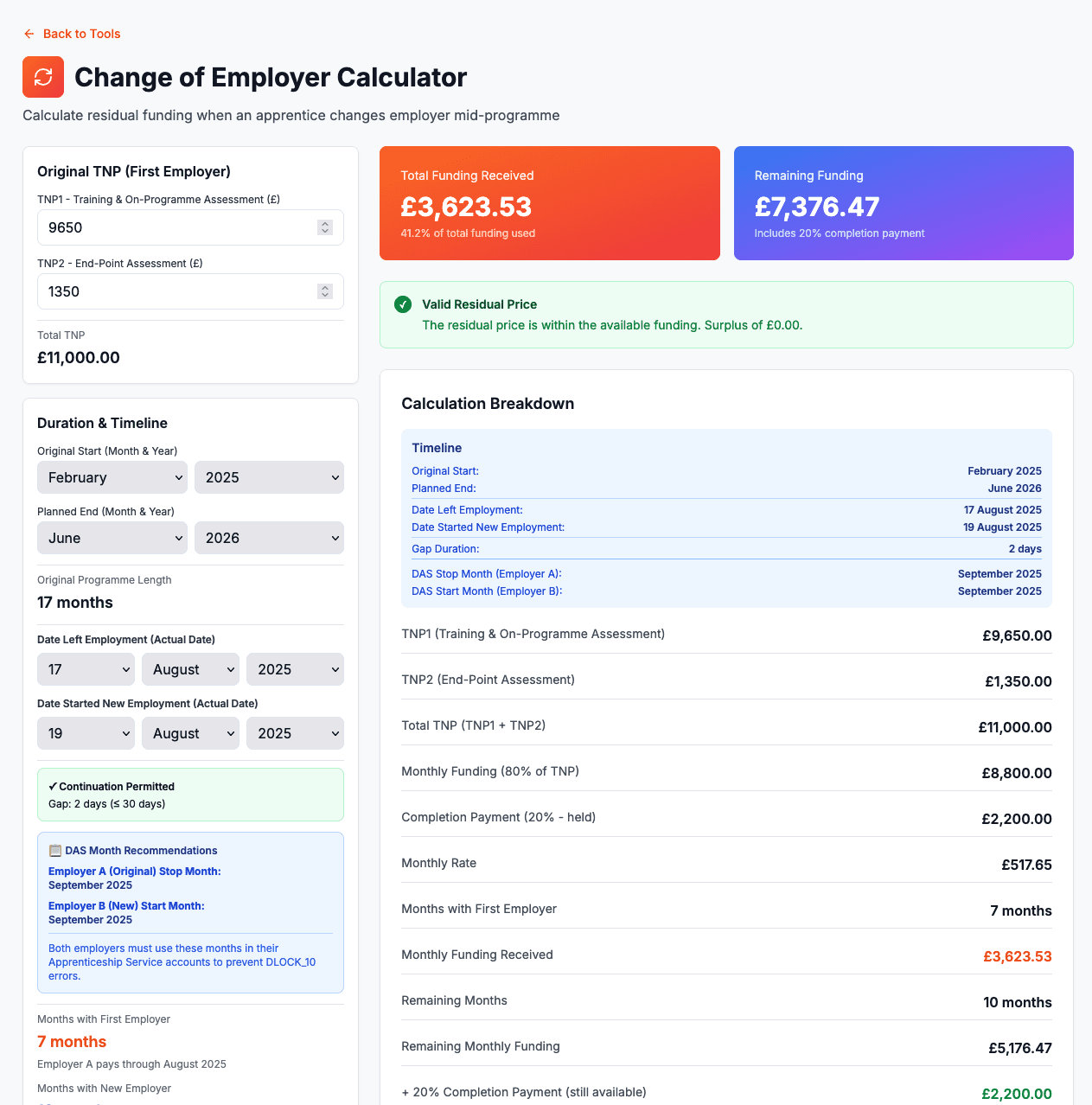
The calculator immediately validates whether continuation is permitted by checking if the gap is 30 days or less. If the gap exceeds 30 days, it displays a warning that break in learning is required and disables the residual funding calculations since continuation isn't applicable. If continuation is permitted and the apprentice left in one month but started in another, an amber DLOCK_10 warning appears explaining that both employers must use the later month in DAS to avoid data lock errors.
The calculator then shows exactly which DAS months each employer should use, displays how many months each employer pays for, calculates the remaining funding available (showing the detailed breakdown of original funding, monthly payments received by the first employer, remaining monthly funding, plus the still-available completion payment), and automatically calculates TNP3 based on remaining funding minus TNP4. It validates that the residual price doesn't exceed available funding and highlights any issues in red before you submit anything.
With validated figures, you can implement the change correctly: continue the existing programme aim in the ILR (no withdrawal), add a new price episode with TNP3 and TNP4 codes starting from the date the apprentice started with the new employer, add a new employment status record for the new employer, and instruct both employers to use the calculator-specified months in their Apprenticeship Service accounts. This ensures ILR and DAS records align perfectly, prevents DLOCK_10, and keeps funding flowing without interruption.
Common Mistakes to Avoid
The most frequent error is letting employers choose their own DAS months based on actual leaving/starting dates rather than using the month-after-leaving rule. This feels intuitive but causes DLOCK_10 every time the change crosses a month boundary. Always use the calculator's DAS month recommendations rather than what seems logical—the DfE's month-end payment attribution rules require this counter-intuitive approach.
Second, providers sometimes calculate residual funding by simply taking the remaining programme duration and applying the original monthly rate, forgetting that the 20% completion payment adds to available funding. This underestimates what's available and leaves money on the table. The residual price can—and should—include both remaining monthly funding and the completion payment, since the first employer never received that 20%.
Third, employers occasionally refuse to change their DAS stop month even when shown the DfE guidance, insisting they'll record the actual leaving date. This forces providers into a withdrawal/restart scenario, losing the benefits of continuation and creating additional administration. Showing employers the official guidance and explaining that their refusal creates DLOCK_10 errors affecting their own apprentice's funding usually brings cooperation.
The Bottom Line
Employer changes within 30 days use continuation workflow with residual pricing, ensuring the new employer pays only for the remaining training and assessment. Calculate residual funding by taking remaining monthly payments plus the 20% completion payment that the first employer never received. Both employers must use the same DAS month—the month after the apprentice left—to prevent DLOCK_10 errors, even though this seems illogical based on actual dates. The month-end employer payment rule explains why this works: whoever is the employer at month-end pays for that month.
The Funding Fox calculator handles all these rules automatically, validating gaps, calculating funding, and recommending exact DAS months before you submit anything. This prevents DLOCK_10 errors, ensures residual pricing stays compliant, and turns a complex process into a simple, guided workflow that gets employer changes right first time, every time.
🔄 Eliminate DLOCK_10 Errors on Employer Changes
Every DLOCK_10 error blocks funding payments and creates urgent admin work. Funding Fox automatically calculates residual funding and recommends the exact DAS months to prevent data locks before you submit.
Start your free trial today and get employer changes right:
✅ Automatic residual funding calculations that never exceed available funding
✅ DAS month recommendations prevent DLOCK_10 before ILR submission
✅ Gap validation instantly shows if continuation is permitted
✅ Step-by-step guidance ensures compliance with DfE rules
Frequently Asked Questions
Q:What happens when an apprentice changes employer mid-programme?
If the gap between employers is 30 days or less, the apprentice continues on the same programme using residual pricing (TNP3 and TNP4). The original employer paid monthly instalments but not the 20% completion payment, which remains available to fund the new employer's portion.
Q:What is the 30-day rule for employer changes?
If the gap is 30 days or less, treat it as continuation with residual pricing. If it exceeds 30 days, record as a withdrawal and restart, requiring a fresh funding agreement.
Q:What is DLOCK_10 and how do I prevent it?
DLOCK_10 occurs when DAS stop/start dates don't align between employers. Both employers must use the same month—specifically the month after the apprentice left the original employer—to prevent this data lock.
Q:How do I calculate residual price (TNP3 and TNP4)?
Take the 80% monthly funding, subtract what the first employer received, then add back the 20% completion payment (not yet paid). The residual price (TNP3 + TNP4) cannot exceed this remaining funding.