Change of Employer Calculator
Calculate residual funding when an apprentice changes employer mid-programme
What is a Change of Employer?
When an apprentice changes employer during their apprenticeship, the funding arrangements must be recalculated. The new employer takes on the apprenticeship at a residual Total Negotiated Price (TNP) that reflects the remaining training to be delivered.
Key Points:
- The government pays 80% of TNP as monthly payments during the programme
- The remaining 20% is held back as a completion payment
- When an apprentice changes employer, the 20% completion payment is still available (not yet paid)
- The residual price must not exceed: remaining monthly payments + completion payment
30-Day Rule:
If the gap between leaving the first employer and starting with the new employer is 30 days or less, the apprenticeship can continue as a change of employer. If the gap exceeds 30 days, you must record it as a withdrawal and restart.
How Residual Funding is Calculated
1. Calculate Original Funding Split
The original TNP (TNP1 + TNP2) is split into 80% monthly funding and 20% completion payment
2. Calculate Funding Already Received
Based on the number of months with the first employer, calculate how much of the 80% monthly funding has been paid
3. Calculate Remaining Funding
Remaining funding = (Unpaid monthly funding) + (20% completion payment still available)
4. Set Residual TNP
The residual TNP (TNP3 + TNP4) must not exceed the remaining funding available
Important:
The residual price (TNP3 + TNP4) should be agreed between the provider and the new employer. It must reflect the remaining training to be delivered and must not exceed the available funding.
Why Use the Change of Employer Calculator?
Accurate Residual Funding Calculation
Automatically calculates the remaining available funding based on months completed with the first employer
Validate 30-Day Gap Rule
Checks if the gap between employers meets the continuation criteria (≤30 days)
DAS Month Recommendations
Provides the correct stop and start months to use in the Apprenticeship Service to avoid DLOCK_10 errors
Auto-Calculate TNP3
Automatically calculates the residual training price (TNP3) based on remaining funding and EPA cost
How to Use the Calculator
1Enter Original TNP
Enter the original total negotiated price agreed with the first employer:
- • TNP1: Training and on-programme assessment cost
- • TNP2: End-point assessment cost
2Enter Timeline Details
Provide the programme timeline:
- • Original Start: When the apprentice started with the first employer
- • Planned End: The original planned end date of the programme
- • Date Left Employment: Exact date they left the first employer
- • Date Started New Employment: Exact date they started with the new employer
3Review Gap Validation
The calculator will automatically check if the gap between employers is 30 days or less. If it exceeds 30 days, you must record as a withdrawal and restart, not a continuation.
4Check DAS Month Recommendations
The tool provides the exact months that both employers should use in their Apprenticeship Service accounts to prevent DLOCK_10 data lock errors.
5Review Residual TNP
The calculator automatically calculates:
- • TNP4: EPA cost for the new employer (auto-copied from TNP2, adjustable)
- • TNP3: Auto-calculated residual training price based on remaining funding
- • Validates that the residual TNP doesn't exceed available funding
6Record in ILR
Record TNP3 and TNP4 in the Apprenticeship Financial Record entity alongside the new employment status record. Ensure both employers use the recommended DAS months.
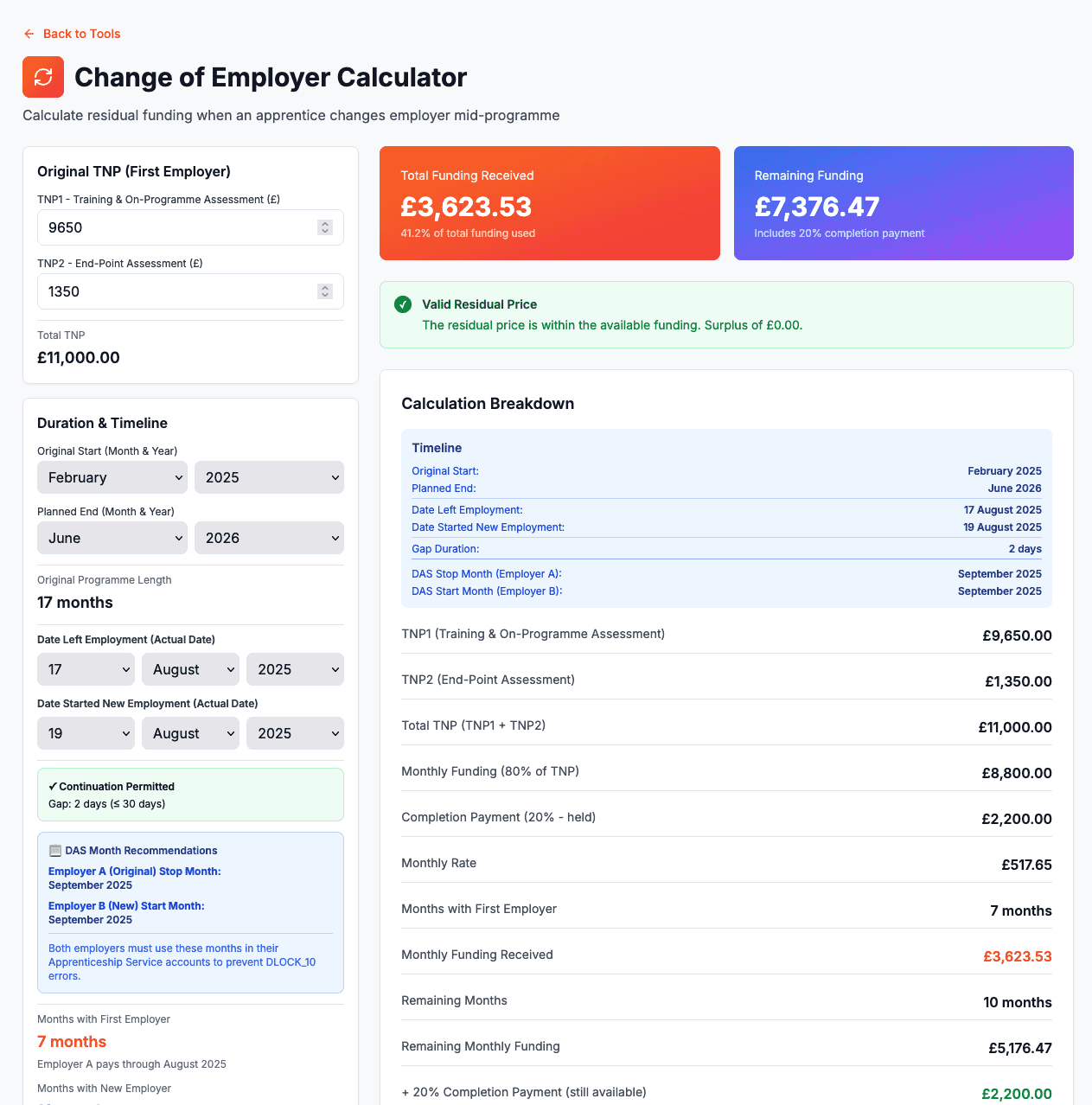
The Change of Employer Calculator Interface
The calculator provides a clear interface to enter employer change details, automatically validate the 30-day gap rule, calculate residual funding, and get DAS month recommendations to prevent DLOCK_10 errors.
Understanding Which Employer Pays for Which Month
Key Rule: An employer pays for a month if they are the employer on the last day of that month.
Example:
- •Apprentice leaves Employer A on 15th January
- •Apprentice starts with Employer B on 22nd January
- •Result: Employer A pays through January (they were employer on 31st Jan). Employer B starts paying from February.
- •DAS Months: Both employers use February as the stop/start month in DAS
Critical Rules for Change of Employer
- •30-day maximum gap: If the gap exceeds 30 days, you must record as withdrawal and restart
- •Residual TNP cannot exceed remaining funding: TNP3 + TNP4 must be ≤ remaining monthly funding + 20% completion payment
- •DAS month alignment: Both employers must use the same stop/start month in their Apprenticeship Service accounts
- •20% completion payment still available: This has not been paid to the first employer, so it's included in remaining funding
- •ILR recording: Record TNP3 and TNP4 in the Apprenticeship Financial Record entity with the new employment status record
- •Agreement required: Provider and new employer must agree the residual TNP before continuing
Avoiding DLOCK_10 Errors
DLOCK_10 is a common data lock error that occurs when the months recorded by the two employers don't match. The calculator helps prevent this by:
✓ Providing exact DAS month recommendations
Both employers must use the same month in their Apprenticeship Service accounts for the stop/start
✓ Warning when dates span different months
If the learner left in one month but started the new employment in a different month, the calculator warns you to ensure both employers use the correct month
✓ Following DfE business rules
The stop/start month should be the month AFTER the learner left employment (when gap ≤30 days)
Tips for Change of Employer Scenarios
- •Use exact dates: Enter the precise dates the apprentice left and started employment to get accurate gap calculations
- •Check the gap first: Validate the gap is ≤30 days before proceeding with continuation process
- •Follow DAS recommendations exactly: Use the exact months provided by the calculator in both Apprenticeship Service accounts
- •Communicate with both employers: Ensure both employers understand which months they're responsible for paying
- •Document the agreement: Keep records of the residual TNP agreed with the new employer
- •Adjust TNP4 if needed: While EPA cost typically stays the same, you can adjust TNP4 if circumstances change
- •Remember the 20% completion payment: This is still available for the new employer, increasing remaining funding
Ready to Calculate?
Use the Change of Employer Calculator to accurately calculate residual funding and get DAS month recommendations.
Open Calculator