Qualifications Finder
How to search and use the Ofqual qualifications database
What is the Qualifications Finder?
The Qualifications Finder gives you instant access to the official Ofqual Register of Regulated Qualifications. Search through thousands of regulated qualifications to verify details, check validity, and find the information you need.
Powered by Ofqual: All data comes directly from the official Ofqual register, ensuring accuracy and reliability.
How to Search for Qualifications
1Navigate to the Qualifications Page
Find Qualifications in the main menu to access the search tool
2Enter Your Search Terms
You can search by:
- •Qualification title - e.g., "Level 3 Business Administration"
- •QAN (Qualification Accreditation Number) - e.g., "60012345"
- •Awarding organisation - e.g., "Pearson", "City & Guilds"
- •Keywords - relevant terms related to the qualification
3Use Filters to Refine Results
Narrow down your search using filters:
4View Qualification Details
Click on any result to see full details including operational dates, assessment methods, guided learning hours, and more
Information Available
Basic Details
Title, QAN, level, type, and awarding organisation
Operational Dates
Availability start/end dates and certification end dates
Learning Hours
Total Qualification Time (TQT) and Guided Learning Hours (GLH)
Assessment Methods
How the qualification is assessed and graded
Sector Classification
Subject area and sector subject area tier information
Funding Eligibility
Whether the qualification is eligible for public funding
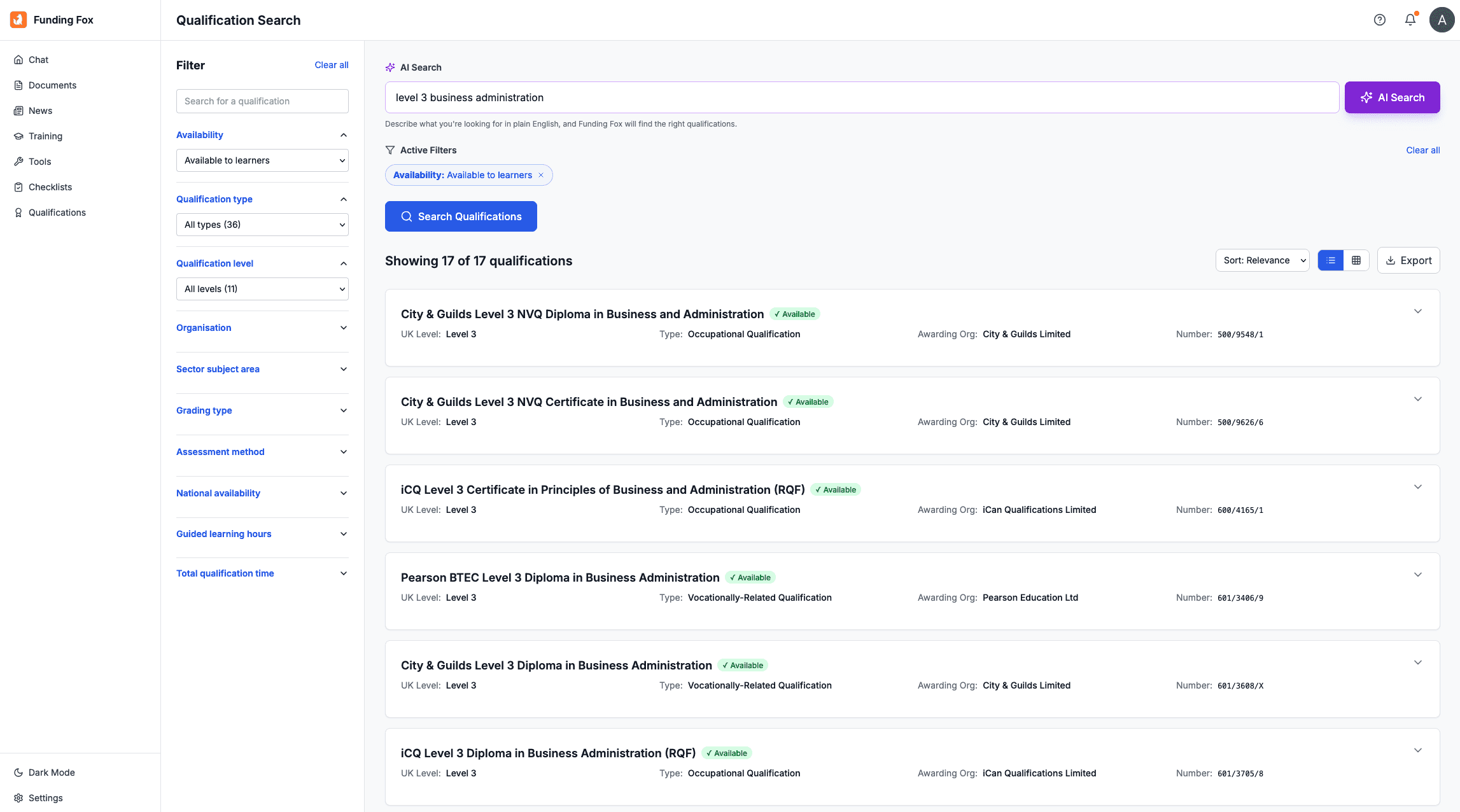
The Qualification Finder Interface
The qualification finder provides powerful search capabilities with filters for level, status, type, and sector to help you quickly find the qualifications you need from the Ofqual register.
Search Tips
- •Use specific terms: "Level 3 Business" works better than just "Business"
- •Check operational dates: Ensure the qualification is still available before planning delivery
- •Verify the QAN: Always double-check the QAN matches what you expect
- •Use filters early: Apply level and status filters to reduce overwhelming results
- •Bookmark frequently used quals: Save time by bookmarking qualifications you reference often